Pabbiolla: A Sweet, Flowing Script Font for Handmade Brands
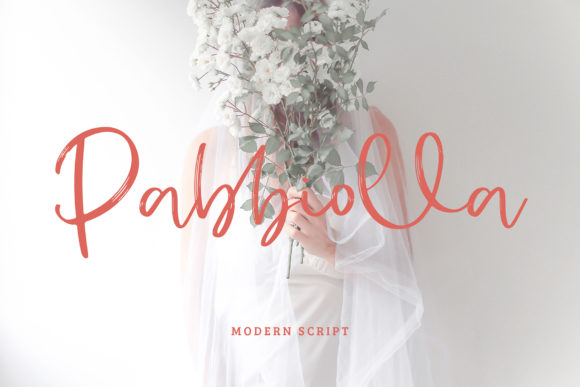
As a maker who designs printable wall art, hand-stamped tags, and seasonal SVG bundles for Etsy, I’m always hunting for script fonts that balance charm with clarity—fonts that make my customers pause, smile, and say, “Yes, this feels like *my* brand.” That’s exactly what Pabbiolla delivers. It’s not just another handwritten font—it’s a brushed script typeface with a gentle, organic rhythm, soft entry and exit strokes, and that unmistakable “sweet touch” in every curve. Delicate without being fragile, flowing without sacrificing legibility, Pabbiolla bridges the gap between artistry and practicality in a way few Script Handwritten fonts do.
Why Pabbiolla Works So Well on Physical Products
When you’re cutting vinyl for boutique gift tags or printing kraft paper labels for small-batch candles, readability at small sizes is non-negotiable. Pabbiolla shines here—not because it’s bold or condensed, but because its open counters, generous spacing, and consistent stroke contrast hold up beautifully at 14–20 pt on printed cards or 18–24 pt on Cricut-cut stickers. I’ve used it for lavender-scented soap labels (3/4" tall), mini chalkboard-style wedding welcome signs (cut from baltic birch), and even heat-transfer vinyl on linen tea towels—and each time, the letterforms stayed graceful and distinct, never collapsing into a blurry swirl.
It’s especially effective for short, high-impact text: names on baby milestone cards, shop names on reusable produce bags, “Hand-Poured” on soy wax candle jars, or “Farmhouse Fresh” on mason jar herb labels. Because Pabbiolla is designed as a display font—not a body text font—it thrives where attention matters most. Don’t try to set full paragraphs in it, but do lean into its strengths for titles, headers, quotes, and decorative accents that anchor your product’s visual identity.
Real Projects Where Pabbiolla Adds Instant Warmth
- Wedding stationery: Use Pabbiolla for couple names on save-the-dates and place cards—paired with a light sans serif like Montserrat Light for addresses and details. The contrast feels intentional, elevated, and deeply personal.
- Seasonal printables: Its flowing energy works beautifully for holiday tags (“Joy,” “Merry,” “Gather”), spring planner covers (“Bloom Slowly”), or autumn market banners (“Harvest & Honey”).
- Product packaging: On matte-finish kraft boxes for handmade bath salts or ceramic studio packaging, Pabbiolla adds artisanal warmth without looking dated or overly ornate.
- Digital downloads: As a premium font in Canva templates or layered PSD files, it gives buyers an instant upgrade over free script fonts—especially when alternates or swashes are included for customizing initials or monograms.
- SVG designs for craft cutters: When converted cleanly (always test outlines first!), Pabbiolla’s smooth curves cut crisply on Silhouette Studio and Cricut Design Space—even with subtle flourishes, if your version includes ligatures or stylistic alternates.
Pairing Pabbiolla Thoughtfully
A great script font needs thoughtful companionship. I consistently pair Pabbiolla with clean, neutral typefaces that let its personality shine—not compete with it. My go-to combos:
- Pabbiolla + Lato Regular: A friendly, versatile sans serif with warm proportions. Perfect for product descriptions on sticker sheets or digital download instructions.
- Pabbiolla + Playfair Display Italic: For vintage-inspired wedding suites or apothecary-style labels—adds subtle serif elegance without overwhelming the script’s softness.
- Pabbiolla + a monoline sans (like Manrope or Inter): Ideal for modern maker brands wanting minimalist contrast—think “Small Batch • Handmade in Oregon” on a tote bag tag.
Avoid pairing it with other highly textured scripts or overly decorative serifs. Pabbiolla’s charm lies in its quiet confidence—not flashiness—so give it breathing room.
What to Check Before You Buy (and Use Commercially)
Before adding Pabbiolla to your design toolkit, verify what’s included: Does it come with uppercase/lowercase, numbers, punctuation, and basic multilingual support (like accented characters for French or Spanish shop names)? Are there alternate glyphs, swashes, or contextual ligatures? These extras matter when designing scalable assets—like editable Canva templates or layered SVG files for crafters.
And crucially: confirm the commercial license terms. As a small shop owner selling physical products, digital downloads, or client work, you need a font licensed for commercial use. Pabbiolla is a commercial font—meaning you can use it on merchandise (mugs, shirts, stickers), in printables, SVG files, social media graphics, and even client-branded packaging—without additional fees. Just be sure your license covers your specific use case (e.g., unlimited end products vs. capped usage).
Making Pabbiolla Work for Your Workflow
In practice, I use Pabbiolla most often in three ways: (1) as outlined text for vinyl cutting (always convert to outlines in Illustrator or Inkscape first), (2) as live text in Canva for editable templates (ensuring the font is properly embedded or substituted for users), and (3) as layered type in Procreate or Photoshop for hand-lettered-style digital prints. For mockups, I preview Pabbiolla on actual label stock—not just white screens—to gauge how its delicate weight reads under real lighting and texture.
It’s not the font for ultra-minimalist tech brands or high-contrast streetwear—but for makers building warm, human-centered brands? Pabbiolla is a quietly powerful tool. It signals care, craftsmanship, and intentionality—not just in how something looks, but in how it makes someone feel when they hold your candle, open your invitation, or hang your printable in their kitchen.
When your typography whispers before your customer even reads the words, you’ve got more than a pretty font—you’ve got brand resonance. That’s the sweet touch of Pabbiolla.